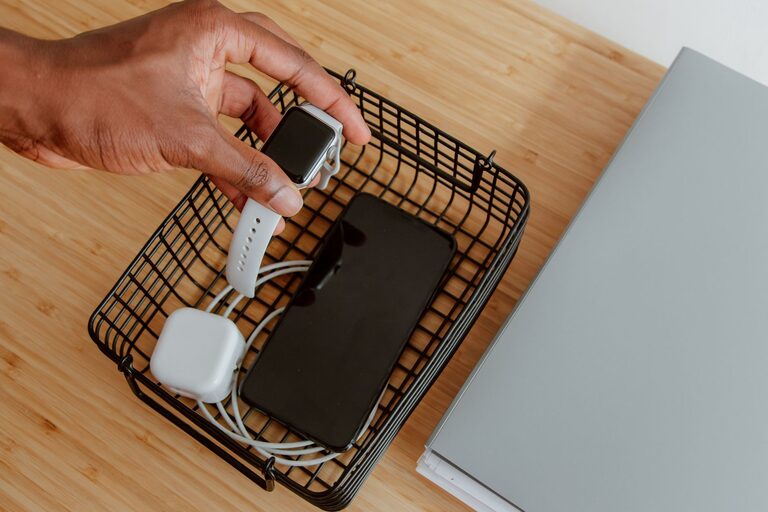
Setting up a charging station for your devices can make a huge difference in keeping your space organized and ensuring all your gadgets are ready to go when you need them. Whether you have smartphones, tablets, smartwatches, or other rechargeable devices, a dedicated charging station helps reduce clutter, manage cables, and streamline your daily routine.
In this post, we’ll walk through the steps to create a simple, effective charging station tailored to your needs.
Why Set Up a Charging Station?
Before diving into how to build one, it’s helpful to understand the benefits:
– Organization: No more tangled cables or misplaced chargers.
– Efficiency: Charge multiple devices at once using one central hub.
– Convenience: Always know where your devices are and keep them fully charged.
– Aesthetics: Keep cords out of sight for a clean, tidy look.
What You’ll Need
Here’s a basic list of items you might need to create your charging station:
– Power strip or USB charging hub with multiple ports
– Cable organizers (clips, ties, or sleeves)
– Storage container or box (optional)
– Charging cables (compatible with your devices)
– Labels (optional, for assigning device spots)
– Adhesive hooks or mounts (optional, for cable management)
Step 1: Choose the Location
The charging station should be placed in a spot that:
– Is easily accessible to everyone using the devices
– Has a nearby electrical outlet or power source
– Is away from water or areas prone to spills
– Has enough surface space for all devices and accessories
Common locations include a desk, a side table, a kitchen counter, or a shelf near a living area.
Step 2: Select Your Charging Equipment
There are two main options for charging multiple devices:
Power Strip with Multiple Outlets
If you have a mix of charging cables, a power strip allows you to plug in all chargers at once. Make sure the power strip has surge protection for safety.
USB Charging Hub
A USB charging hub is often more compact and can charge multiple devices through built-in USB ports. Look for a hub that supports fast charging and has enough ports for all your devices.
Step 3: Organize Your Charging Cables
Cables can quickly become tangled and messy. Taming them will keep your station neat.
– Use cable clips or ties to bundle cables and prevent tangles.
– Consider cable sleeves if you want to group multiple cables together.
– Shorten long cables by coiling and securing them.
– Use adhesive hooks on the side or back of your charging area to guide cables and keep them in place.
Step 4: Set Up Device Slots or Holders
Allow each device its own spot for charging. You can:
– Use a charging dock or stand designed for phones, tablets, or smartwatches.
– Repurpose small boxes or trays to keep devices separated.
– Use DIY dividers inside a box to organize devices.
This prevents devices from overlapping and reduces the risk of damage.
Step 5: Label Each Spot (Optional)
If multiple people use the charging station, labeling each device’s spot or cable can help avoid confusion. Use simple stickers or tags to mark whose device it is or what device the cable belongs to.
Step 6: Maintain Safety
A few safety tips for your charging station:
– Avoid overloading outlets or power strips.
– Use chargers and cables certified by the device manufacturer.
– Keep liquids away from the charging area.
– Regularly inspect cables for damage and replace if worn.
Extra Tips for an Efficient Charging Station
– Place the charging station near your usual gathering spots to encourage everyone to use it.
– Use a charging station with fast charging technology to save time.
– If you have wireless charging-compatible devices, consider adding a wireless charging pad.
– Keep spare cables handy in a drawer or organizer nearby.
Summary
Setting up a charging station is a straightforward way to keep your devices powered and your space clutter-free. By choosing the right location, organizing cables, and using the proper charging equipment, you can create a station that meets your needs and simplifies your daily charging routine.
With these steps, you’ll enjoy a neat, effective charging setup that keeps your devices charged and ready to go. Happy charging!
About the Author